
第12章_集合框架
12.1 概述
- 生活中的容器

12.1.1 数组的特点与弊端
为什么有了数组还需要用集合框架???
一方面,面向对象语言对事物的体现都是以 对象 的形式,
为了方便对多个对象的操作,就要对 对象 进行存储。
另一方面,使用数组存储对象方面具有
一些弊端,而 Java 集合就像一种容器,可以
动态地把多个对象的引用放入容器中。
- 数组在内存存储方面的
特点:- 数组初始化以后,长度就确定了。
- 数组中的添加的元素是依次紧密排列的,有序的,可以重复的。
- 数组声明的类型,就决定了进行元素初始化时的类型。不是此类型的变量,就不能添加。
- 可以存储基本数据类型值,也可以存储引用数据类型的变量
- 数组在存储数据方面的
弊端:- 数组初始化以后,长度就不可变了,不便于扩展
- 数组中提供的属性和方法少,不便于进行添加、删除、插入、获取元素个数等操作,且效率不高。
- 数组存储数据的特点单一,只能存储有序的、可以重复的数据
- Java 集合框架中的类可以用于存储多个
对象,还可用于保存具有映射关系的关联数组。
12.1.2 java 集合框架体系
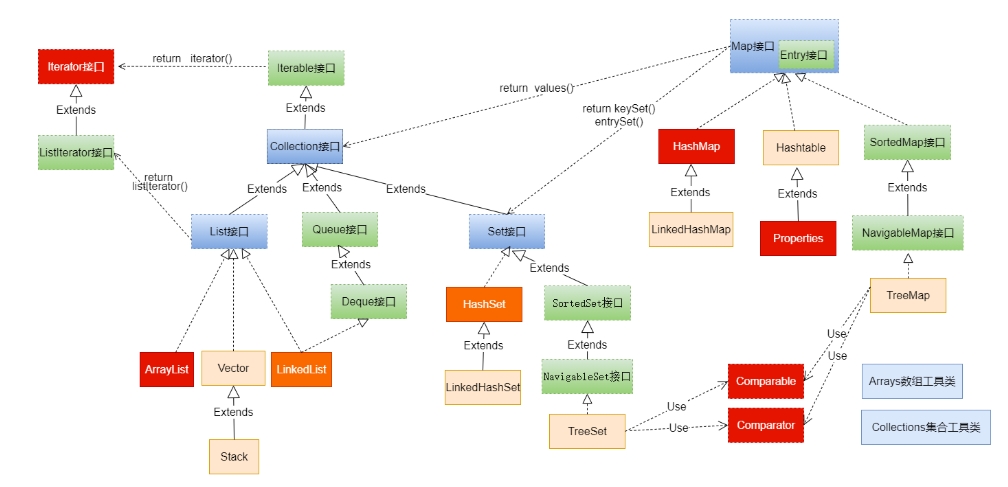
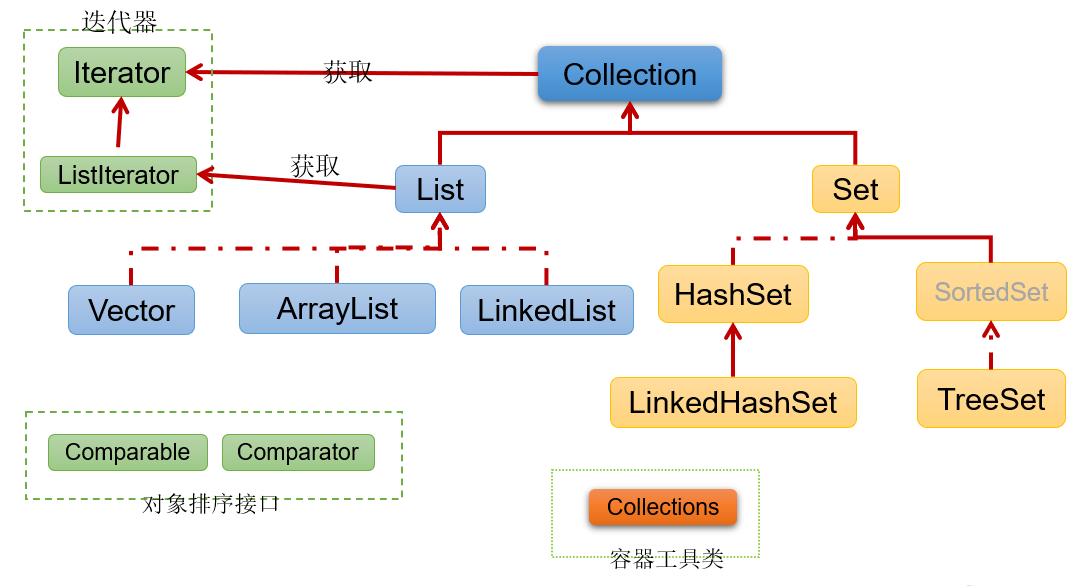
Java 集合可分为
Collection和Map两大体系:- Collection 接口:用于存储一个一个的数据,也称
单列数据集合。- List 子接口:用来存储有序的、可以重复的数据(主要用来替换数组,"动态"数组)
- 实现类:
ArrayList(主要实现类) 、LinkedList、Vector
- 实现类:
- Set 子接口:用来存储无序的、不可重复的数据(类似于高中讲的"集合")
- 实现类:
HashSet(主要实现类) 、LinkedHashSet、TreeSet
- 实现类:
- List 子接口:用来存储有序的、可以重复的数据(主要用来替换数组,"动态"数组)
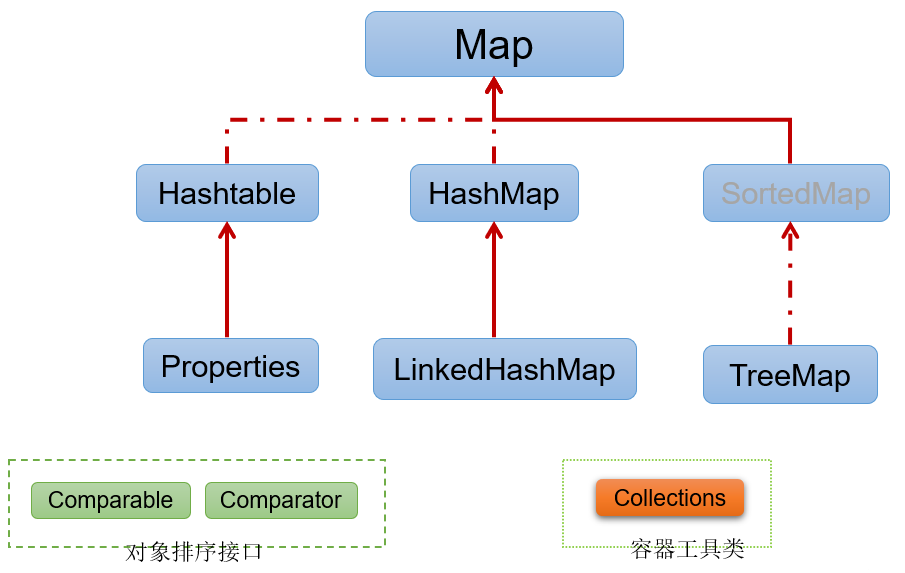
Map 接口:用于存储具有映射关系 “key-value对” 的集合,即一对一对的数据,
也称
双列数据集合。(类似于高中的函数、映射。(x1,y1),(x2,y2) ---> y = f(x) )HashMap(主要实现类)、LinkedHashMap、TreeMap、Hashtable、Properties
- Collection 接口:用于存储一个一个的数据,也称
- JDK 提供的集合 API 位于
java.util包内
- 图示:集合框架全图
- 简图1: Collection接口继承树
- 简图2:Map接口继承树
12.2 Collection 接口及方法
JDK 不提供此接口的任何直接实现,而是提供更具体的子接口(如:
Set和List)去实现。Collection 接口是
List和Set接口的父接口,该接口里定义的方法既可用于操作 Set 集合,也可用于操作 List 集合。方法如下:
12.2.1 添加
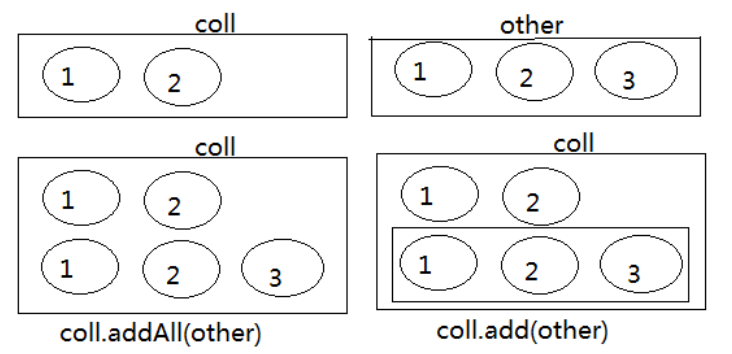
add(E obj):添加元素对象到当前集合中addAll(Collection other):添加 other 集合中的所有元素对象到当前集合中,即 this = this ∪ other
- 示例:注意
add和addAll的区别
@Test
public void testAdd(){
    //ArrayList是Collection的子接口List的实现类之一。
    Collection coll = new ArrayList();
    coll.add("小李广");
    coll.add("扫地僧");
    coll.add("石破天");
    System.out.println(coll);  // [小李广, 扫地僧, 石破天]
}

@Test
public void testAddAll(){
    Collection c1 = new ArrayList();
    c1.add(1);
    c1.add(2);
    System.out.println("c1集合元素的个数:" + c1.size()); //c1集合元素的个数:2
    System.out.println("c1 = " + c1); // c1 = [1, 2]

    Collection c2 = new ArrayList();
    c2.add(1);
    c2.add(2);
    System.out.println("c2集合元素的个数:" + c2.size()); //c2集合元素的个数:2
    System.out.println("c2 = " + c2); // c2 = [1, 2]

    Collection other = new ArrayList();
    other.add(1);
    other.add(2);
    other.add(3);
    System.out.println("other集合元素的个数:" + other.size()); // other集合元素的个数:3
    System.out.println("other = " + other); // other = [1, 2, 3]
    System.out.println();

    c1.addAll(other);
    System.out.println("c1集合元素的个数:" + c1.size()); // c1集合元素的个数:5
    System.out.println("c1.addAll(other) = " + c1); // c1.addAll(other) = [1, 2, 1, 2, 3]

    c2.add(other);
    System.out.println("c2集合元素的个数:" + c2.size()); // c2集合元素的个数:3
    System.out.println("c2.add(other) = " + c2); // c2.add(other) = [1, 2, [1, 2, 3]]
}图示:
coll.addAll(other);与coll.add(other);
12.2.2 判断
int size():获取当前集合中实际存储的元素个数boolean isEmpty():判断当前集合是否为空集合boolean contains(Object obj):判断当前集合中是否存在一个与 obj 对象 equals 返回 true 的元素boolean containsAll(Collection coll):判断 coll 集合中的元素是否在当前集合中都存在。换言之 : coll 集合是否是当前集合的 “子集”
boolean equals(Object obj):判断当前集合与 obj 是否相等
- 示例:
@Test
public void test01() {
    Collection coll = new ArrayList();
    System.out.println("coll在添加元素之前,isEmpty = " + coll.isEmpty()); // coll在添加元素之前,isEmpty = true
    coll.add("小李广");
    coll.add("扫地僧");
    coll.add("石破天");
    coll.add("佛地魔");
    System.out.println("coll的元素个数" + coll.size()); // coll的元素个数4
    System.out.println("coll在添加元素之后,isEmpty = " + coll.isEmpty()); // coll在添加元素之后,isEmpty = false
}

@Test
public void test02() {
    Collection coll = new ArrayList();
    coll.add("小李广");
    coll.add("扫地僧");
    coll.add("石破天");
    coll.add("佛地魔");
    System.out.println("coll = " + coll); // coll = [小李广, 扫地僧, 石破天, 佛地魔]
    System.out.println("coll是否包含“小李广” = " + coll.contains("小李广")); // coll是否包含“小李广” = true
    System.out.println("coll是否包含“宋红康” = " + coll.contains("宋红康")); // coll是否包含“宋红康” = false

    Collection other = new ArrayList();
    other.add("小李广");
    other.add("扫地僧");
    other.add("尚硅谷");
    System.out.println("other = " + other); // other = [小李广, 扫地僧, 尚硅谷]
    System.out.println("coll.containsAll(other) = " + coll.containsAll(other)); // coll.containsAll(other) = false
}

@Test
public void test03(){
    Collection c1 = new ArrayList();
    c1.add(1);
    c1.add(2);
    System.out.println("c1集合元素的个数:" + c1.size()); // c1集合元素的个数:2
    System.out.println("c1 = " + c1); // c1 = [1, 2]

    Collection c2 = new ArrayList();
    c2.add(1);
    c2.add(2);
    System.out.println("c2集合元素的个数:" + c2.size()); // c2集合元素的个数:2
    System.out.println("c2 = " + c2); // c2 = [1, 2]

    Collection other = new ArrayList();
    other.add(1);
    other.add(2);
    other.add(3);
    System.out.println("other集合元素的个数:" + other.size()); // other集合元素的个数:3
    System.out.println("other = " + other); // other = [1, 2, 3]
    System.out.println();

    c1.addAll(other);
    System.out.println("c1集合元素的个数:" + c1.size()); // c1集合元素的个数:5
    System.out.println("c1.addAll(other) = " + c1);  // c1.addAll(other) = [1, 2, 1, 2, 3]
    System.out.println("c1.contains(other) = " + c1.contains(other)); // c1.contains(other) = false
    System.out.println("c1.containsAll(other) = " + c1.containsAll(other)); // c1.containsAll(other) = true
    System.out.println();

    c2.add(other);
    System.out.println("c2集合元素的个数:" + c2.size()); // c2集合元素的个数:3
    System.out.println("c2.add(other) = " + c2); // c2.add(other) = [1, 2, [1, 2, 3]]
    System.out.println("c2.contains(other) = " + c2.contains(other)); // c2.contains(other) = true
    System.out.println("c2.containsAll(other) = " + c2.containsAll(other)); // c2.containsAll(other) = false
}12.2.3 删除
void clear():清空集合元素boolean remove(Object obj):从当前集合中删除第一个找到的与 obj 对象 equals 返回 true 的元素。boolean removeAll(Collection coll):从当前集合中删除所有与 coll 集合中相同的元素。即
this = this - this ∩ collboolean retainAll(Collection coll):从当前集合中删除两个集合中不同的元素,使得当前集合仅保留与 coll 集合中的元素相同的元素,即当前集合中仅保留两个集合的交集,即
this = this ∩ coll;
- 示例:注意几种删除方法的区别
@Test
public void testRemove(){
    Collection coll = new ArrayList();
    coll.add("小李广");
    coll.add("扫地僧");
    coll.add("石破天");
    coll.add("佛地魔");
    System.out.println("coll = " + coll); // coll = [小李广, 扫地僧, 石破天, 佛地魔]

    coll.remove("小李广");
    System.out.println("删除元素\"小李广\"之后coll = " + coll); // 删除元素"小李广"之后coll = [扫地僧, 石破天, 佛地魔]

    coll.clear();
    System.out.println("coll清空之后,coll = " + coll); // coll清空之后,coll = []
}

@Test
public void testRemoveAll() {
    Collection coll = new ArrayList();
    coll.add("小李广");
    coll.add("扫地僧");
    coll.add("石破天");
    coll.add("佛地魔");
    System.out.println("coll = " + coll);  // coll = [小李广, 扫地僧, 石破天, 佛地魔]

    Collection other = new ArrayList();
    other.add("小李广");
    other.add("扫地僧");
    other.add("尚硅谷");
    System.out.println("other = " + other);  // other = [小李广, 扫地僧, 尚硅谷]

    coll.removeAll(other);
    System.out.println("coll.removeAll(other)之后,coll = " + coll);  // coll.removeAll(other)之后,coll = [石破天, 佛地魔]
    System.out.println("coll.removeAll(other)之后,other = " + other);  // coll.removeAll(other)之后,other = [小李广, 扫地僧, 尚硅谷]
}

@Test
public void testRetainAll() {
    Collection coll = new ArrayList();
    coll.add("小李广");
    coll.add("扫地僧");
    coll.add("石破天");
    coll.add("佛地魔");
    System.out.println("coll = " + coll); // coll = [小李广, 扫地僧, 石破天, 佛地魔]

    Collection other = new ArrayList();
    other.add("小李广");
    other.add("扫地僧");
    other.add("尚硅谷");
    System.out.println("other = " + other); // other = [小李广, 扫地僧, 尚硅谷]

    coll.retainAll(other);
    System.out.println("coll.retainAll(other)之后,coll = " + coll);  // coll.retainAll(other)之后,coll = [小李广, 扫地僧]
    System.out.println("coll.retainAll(other)之后,other = " + other); // coll.retainAll(other)之后,other = [小李广, 扫地僧, 尚硅谷]
}12.2.4 其它
Object[] toArray():返回包含当前集合中所有元素的数组hashCode():获取集合对象的哈希值iterator():返回迭代器对象,用于集合遍历
- 示例:
@Test
public void testElse() {
    Collection coll = new ArrayList();

    coll.add("小李广");
    coll.add("扫地僧");
    coll.add("石破天");
    coll.add("佛地魔");
    //集合转换为数组:集合的toArray()方法
    Object[] objects = coll.toArray();
    System.out.println("用数组返回coll中所有元素:" + Arrays.toString(objects));
    // 用数组返回coll中所有元素:[小李广, 扫地僧, 石破天, 佛地魔]

    //对应的,数组转换为集合:调用Arrays的asList(Object ...objs)
    Object[] arr1 = new Object[]{123,"AA","CC"};
    Collection list = Arrays.asList(arr1);
    System.out.println(list); // [123, AA, CC]
}
iterator()在下面演示 ...
12.3 Iterator(迭代器)接口
12.3.1 Iterator 接口
在程序开发中,经常需要遍历集合中的所有元素。针对这种需求,
JDK 专门提供了一个接口
java.util.Iterator。Iterator接口也是 Java 集合中的一员,但它与
Collection、Map接口有所不同。- Collection 接口与 Map 接口主要用于
存储元素 Iterator,被称为迭代器接口,本身并不提供存储对象的能力,主要用于遍历Collection 中的元素
- Collection 接口与 Map 接口主要用于
Collection 接口继承了
java.lang.Iterable接口,该接口有一个iterator()方法,那么所有实现了Collection 接口的集合类都有一个
iterator()方法,用以返回一个实现了 Iterator 接口的对象。public Iterator iterator(): 获取集合对应的迭代器,用来遍历集合中的元素的。集合对象每次调用
iterator()方法都得到一个全新的迭代器对象,默认游标都在集合的第一个元素之前。
Iterator 接口的常用方法如下:
public E next(): 返回迭代的下一个元素。public boolean hasNext(): 如果仍有元素可以迭代,则返回 true。
注意:在调用
it.next()方法之前必须要调用it.hasNext()进行检测。若不调用,且下一条记录无效,直接调用
it.next()会抛出NoSuchElementException异常。
- 举例:
@Test
public void testNext(){
    Collection coll = new ArrayList();
    coll.add("小李广");
    coll.add("扫地僧");
    coll.add("石破天");

    Iterator iterator = coll.iterator();
    System.out.println(iterator.next()); // 小李广
    System.out.println(iterator.next()); // 扫地僧
    System.out.println(iterator.next()); // 石破天
    //System.out.println(iterator.next()); //报 NoSuchElementException 异常
}

@Test
public void testHasNext(){
    Collection coll = new ArrayList();
    coll.add("小李广");
    coll.add("扫地僧");
    coll.add("石破天");

    Iterator iterator = coll.iterator();//获取迭代器对象
    while(iterator.hasNext()) {//判断是否还有元素可迭代
        System.out.println(iterator.next());//取出下一个元素
    }
}12.3.2 迭代器执行原理
Iterator 迭代器对象在遍历集合时,内部采用指针的方式来跟踪集合中的元素,
接下来通过一个图例来演示 Iterator 对象迭代元素的过程:
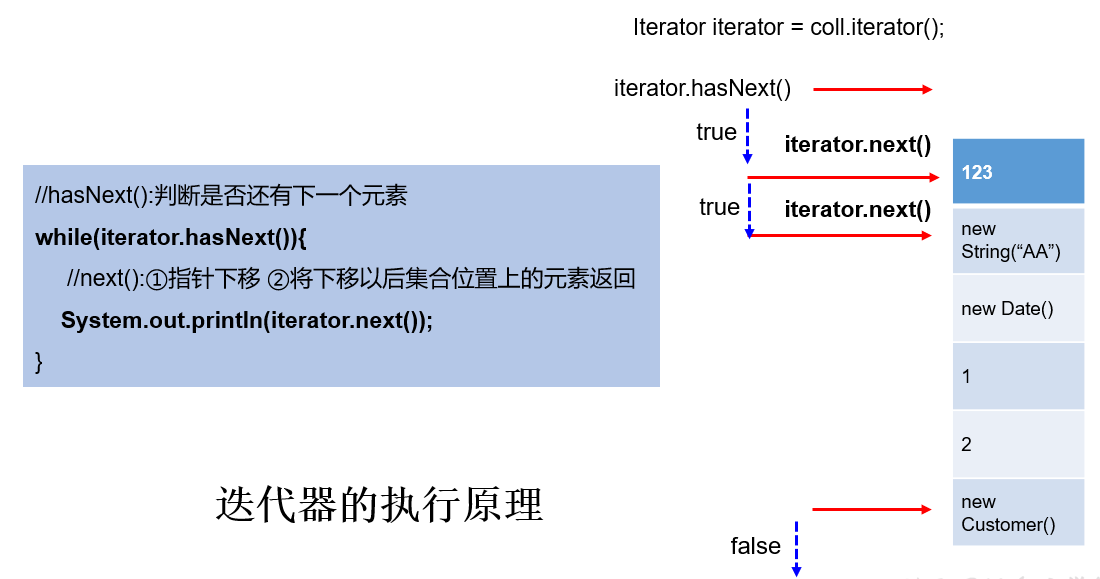
另外:使用 Iterator 迭代器删除元素:java.util.Iterator 迭代器中有一个方法:void remove() ;
Iterator iter = coll.iterator();//回到起点
while(iter.hasNext()){
    Object obj = iter.next();
    if(obj.equals("Tom")){
        iter.remove();
    }
}注意:
Iterator可以删除集合的元素,但是遍历过程中通过迭代器对象的remove方法,不是集合对象的
remove方法。如果还未调用
next()或在上一次调用next()方法之后已经调用了remove()方法,再调用
remove()都会报IllegalStateException。Collection已经有remove(xx)方法了,为什么Iterator迭代器还要提供删除方法呢?因为迭代器的
remove()可以按指定的条件进行删除。
- 例如:要删除以下集合元素中的偶数
@Test
public void testRemoveEven(){
    Collection coll = new ArrayList();
    coll.add(1);
    coll.add(2);
    coll.add(3);
    coll.add(4);
    coll.add(5);
    coll.add(6);

    Iterator iterator = coll.iterator();
    while(iterator.hasNext()){
        Integer element = (Integer) iterator.next();
        if(element % 2 == 0){
            iterator.remove();
        }
    }
    System.out.println(coll);  // [1, 3, 5]
}在
JDK8.0时,Collection接口有了removeIf方法,即可以根据条件删除。(第18章中再讲)
12.3.3 foreach 循环
foreach循环(也称增强for循环)是JDK5.0中定义的一个高级 for 循环,专门用来
遍历数组和集合的。foreach循环的语法格式:
for(元素的数据类型 局部变量 : Collection 集合或数组){
  	//操作局部变量的输出操作
}
//这里局部变量就是一个临时变量,自己命名就可以12.4 Collection子接口1:List
12.4.1 List 接口特点
鉴于
Java中数组用来存储数据的局限性,我们通常使用java.util.List替代数组List 集合类中
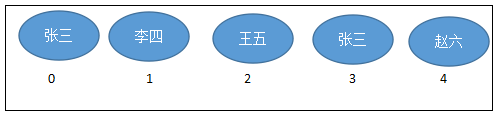
元素有序、且可重复,集合中的每个元素都有其对应的顺序索引。举例:List 集合存储数据,就像银行门口客服,给每一个来办理业务的客户分配序号:
第一个来的是“张三”,客服给他分配的是0;第二个来的是“李四”,客服给他分配的1;
以此类推,最后一个序号应该是 “总人数-1” 。
JDK API 中 List 接口的实现类常用的有:
ArrayList、LinkedList和Vector。
12.4.2 List 接口方法
List 除了从 Collection 集合继承的方法外,List 集合里添加了一些 根据索引 来操作集合元素的方法。
插入元素
void add(int index, Object ele): 在index位置插入ele元素boolean addAll(int index, Collection eles):从index位置开始将
eles中的所有元素遍历地添加进来
获取元素
Object get(int index): 获取指定index位置的元素List subList(int fromIndex, int toIndex): 返回从fromIndex到toIndex位置的子集合
获取元素索引
int indexOf(Object obj): 返回 obj 在集合中首次出现的位置int lastIndexOf(Object obj): 返回 obj 在当前集合中末次出现的位置
删除和替换元素
Object remove(int index): 移除指定index位置的元素,并返回此元素Object set(int index, Object ele): 设置指定index位置的元素为ele